Docker & Environment Setup
This guide explains how to configure and deploy the Mdlwr application stack on your production server using Docker Compose.
1. Prerequisites
Before proceeding with the steps below, ensure that your target server has the following installed:
- Docker Engine (latest stable version)
- Docker Compose (v2 plugin)
Installation Guide (OS Specific)
If you do not have Docker installed, please follow the official installation guide from Docker's documentation based on your operating system:
- Install Docker Engine on Ubuntu
- Install Docker Engine on Debian
- Install Docker Engine on CentOS/RHEL/Rocky/Alma
2. Directory Structure Setup
On your target server (e.g., VPS or local client environment), create a base directory to store the configuration, environment files, and Docker volumes.
Run the following commands in your terminal:
sudo mkdir -p /opt/mdlwr/{volumes/postgres,volumes/redis,nginx,logs,tmp/incoming,apps/static/exports,apps/static/custom}
cd /opt/mdlwr
3. Environment Configuration (.env)
Create an .env file inside your base directory (/opt/mdlwr/.env) to store sensitive environment variables, database credentials, and base paths.
⚠️ Security Note: Make sure to change the default
DEFAULT_ADMIN_PASSvalue from password123 to a strong and secure password before deploying to production.
Example .env configuration:
#Rebranding
#APP_NAME=MdlWr
#APP_LOGO=/static/custom/icon.png
#APP_FAVICON=/static/custom/icon.ico
#LOGIN_BG_IMAGE=/static/custom/login_background.png

# Volume for docker compose
#MDLWR_BASE=D:/mdlwr
MDLWR_BASE=/opt/mdlwr

#Important: For SITE_TYPE=remote configurations, you must uncomment the 'ACTIVATE ONLY FOR SITE REMOTE MDLWR' section in your docker-compose.yml file for the services to function correctly.
SITE_TYPE=central
SITE_ID=00000000-0000-0000-0000-000000000000
SYNC_INTERVAL=300

# --- App Mode ---
FLASK_APP=run.py
FLASK_ENV=development
FLASK_DEBUG=0
DEBUG=DEBUG

# --- Security ---
SECRET_KEY=b572f2578c47cb1565afb748179a5831f3242e8b15bea78ff17698xxxxxxxxxx
SHOW_PASSWORD=False

# --- PostgreSQL Settings FOR DOCKER ---
DEFAULT_ADMIN_USER=admin
DEFAULT_ADMIN_EMAIL=admin@example.com
DEFAULT_ADMIN_PASS=password123

DB_HOST=db
DB_PORT=5432
DB_USERNAME=myuser
DB_PASS=mypass
DB_NAME=mydb

DATABASE_URL=postgresql://myuser:mypass@db:5432/mydb
REDIS_URL=redis://redis:6379

# --- Redis ---
REDIS_HOST=redis
REDIS_PORT=6379

# Logging
LOG_LEVEL=INFO
LOG_TO_REDIS=True
CONSOLE_DEBUG=False

#Integration flow
MAX_FLOW_DEPTH=10
4. Nginx Configuration File
The Nginx container requires a robust configuration file mapped from the host to handle SSL certificates, WebSocket routing, security headers, and reverse proxying to backend services.
Create or update the nginx.conf file inside /opt/mdlwr/nginx/nginx.conf with the following production-ready configuration:
events {
    worker_connections 1024;
}

http {
    # --- Konfigurasi Global & Headers ---
    include          /etc/nginx/mime.types;
    default_type     application/octet-stream;
    server_tokens    off;

    add_header X-Frame-Options "SAMEORIGIN" always;
    add_header X-Content-Type-Options "nosniff" always;
    add_header X-XSS-Protection "1; mode=block" always;
    add_header Referrer-Policy "no-referrer-when-downgrade" always;
    add_header Strict-Transport-Security "max-age=31536000; includeSubDomains" always;
    add_header Permissions-Policy "camera=(), microphone=(), geolocation=(), payment=()" always;
    add_header Content-Security-Policy "default-src 'self' 'unsafe-inline' 'unsafe-eval'; img-src 'self' data:; worker-src 'self' blob:; frame-ancestors 'self';" always;


    resolver 127.0.0.11 valid=10s;
    access_log /app/logs/nginx-access.log;
    error_log  /app/logs/nginx-error.log warn;

    # --- Maps & Rate Limiting ---
    map $http_upgrade $connection_upgrade {
        default upgrade;
        ''      close;
    }

    map $uri $limit_key {
        ~^/static/   "";
        default      $remote_addr;
    }

    limit_req_zone $remote_addr zone=api_limit:10m rate=20r/s;
    limit_req_status 429;

    # --- SERVER 1: Redirect HTTP ke HTTPS ---
    server {
        listen 80;
        server_name mdlwr.web.id;
        return 301 https://$host$request_uri;
    }

    # --- SERVER 2: HTTPS (Port 443) ---
    server {
        listen 443 ssl;
        server_name mdlwr.web.id;

        ssl_certificate /etc/letsencrypt/live/mdlwr.web.id/fullchain.pem;
        ssl_certificate_key /etc/letsencrypt/live/mdlwr.web.id/privkey.pem;
        ssl_protocols TLSv1.2 TLSv1.3;
        ssl_ciphers HIGH:!aNULL:!MD5;

        client_max_body_size 100M;

        location @handle_unauthorized {
            return 302 /login;
        }

        # Global Proxy Headers
        proxy_set_header Host $host;
        proxy_set_header X-Real-IP $remote_addr;
        proxy_set_header X-Forwarded-For $proxy_add_x_forwarded_for;
        proxy_set_header X-Forwarded-Proto $scheme;

        # --- SERVICES ---

        # --- DOCKER LOG STREAM (WEBSOCKET) ---
        location ~ ^/system/logs/stream/(.*) {
            set $target_terminal terminal;
            proxy_pass http://$target_terminal:5002/logs/stream/$1;

            proxy_http_version 1.1;
            proxy_set_header Upgrade $http_upgrade;
            proxy_set_header Connection 'upgrade';

            proxy_read_timeout 86400s;
            proxy_send_timeout 86400s;

            proxy_set_header X-Forwarded-Proto $scheme;
            proxy_set_header Host $host;
        }

       # --- DOCKER TERMINAL EXEC (WEBSOCKET) ---
        location ~ ^/system/logs/exec/(.*) {
            set $target_terminal terminal;
            proxy_pass http://$target_terminal:5001/logs/exec/$1;

            proxy_http_version 1.1;
            proxy_set_header Upgrade $http_upgrade;
            proxy_set_header Connection $connection_upgrade;

            proxy_read_timeout 86400s;
            proxy_send_timeout 86400s;

            proxy_set_header X-Forwarded-Proto $scheme;
            proxy_set_header Host $host;
            proxy_set_header X-Real-IP $remote_addr;
            proxy_set_header X-Forwarded-For $proxy_add_x_forwarded_for;
        }

        location = /internal-auth-check {
            internal;
            proxy_pass http://app:5000/internal/auth;
            proxy_pass_request_body off;
            proxy_set_header Content-Length "";
            proxy_set_header Cookie $http_cookie;
            proxy_set_header Host $host;
            proxy_intercept_errors on;
        }

        location ^~ /static/exports/ {
            auth_request /internal-auth-check;
            error_page 401 403 = @handle_unauthorized;

            proxy_pass http://app:5000;
            proxy_set_header Host $host;
            proxy_set_header X-Real-IP $remote_addr;
            proxy_set_header X-Forwarded-For $proxy_add_x_forwarded_for;
            proxy_set_header X-Forwarded-Proto $scheme;

            expires 0;
            add_header Cache-Control "private, no-cache, no-store, must-revalidate";
        }

        location ^~ /static/ {
            proxy_pass http://app:5000;
            proxy_set_header Host $host;
            proxy_set_header X-Real-IP $remote_addr;
            proxy_set_header X-Forwarded-For $proxy_add_x_forwarded_for;
            proxy_set_header X-Forwarded-Proto $scheme;

            expires 7d;
            add_header Cache-Control "public, no-transform";
        }

        location / {
            proxy_pass http://app:5000;
            proxy_set_header Host $host;
            proxy_set_header X-Real-IP $remote_addr;
            proxy_set_header X-Forwarded-For $proxy_add_x_forwarded_for;
            proxy_set_header X-Forwarded-Proto $scheme;
        }
    }
}
5. Docker Compose File (docker-compose.yml)
Create a docker-compose.yml file in the /opt/mdlwr/ root directory to define all application stack services including Database, Redis, Web Application, Celery Workers, File Manager, and Nginx reverse proxy.
Example docker-compose.yml file:
x-logging: &default-logging
  logging:
    driver: "json-file"
    options:
      max-size: "10m"
      max-file: "3"

services:
  app:
    <<: *default-logging
    image: ghcr.io/ikhsanrasyidi/mdlwr:latest
    user: root
    command: gunicorn run:app -w 1 --threads 2 -b 0.0.0.0:5000 --timeout 120 --graceful-timeout 5
    stop_grace_period: 5s
    env_file:
      - .env
    environment:
      TZ: Asia/Jakarta
    depends_on:
      db:
        condition: service_healthy
      redis:
        condition: service_healthy
    volumes:
      - ${MDLWR_BASE}/logs:/app/logs
      - ${MDLWR_BASE}/tmp/incoming:/app/tmp/incoming
      - ${MDLWR_BASE}/apps/static:/app/apps/static
      - ${MDLWR_BASE}/apps/static/custom:/app/apps/static/custom
      - /var/run/docker.sock:/var/run/docker.sock
    deploy:
      replicas: 1
    restart: always
    mem_limit: 600m
    cpus: "0.7"
    healthcheck:
      test: ["CMD", "curl", "-f", "http://localhost:5000/"]
      interval: 3s
      timeout: 2s
      retries: 5
      start_period: 3s

  terminal:
    <<: *default-logging
    container_name: terminal
    image: ghcr.io/ikhsanrasyidi/mdlwr-terminal:latest
    stop_grace_period: 3s
    env_file:
      - .env
    environment:
      TZ: Asia/Jakarta
    ports:
      - "5001:5001"
      - "5002:5002"
    volumes:
      - ${MDLWR_BASE}/logs:/app/logs
      - ${MDLWR_BASE}/tmp/incoming:/app/tmp/incoming
      - ${MDLWR_BASE}/apps/static:/app/static
      - /var/run/docker.sock:/var/run/docker.sock
    depends_on:
      app:
        condition: service_healthy
    restart: always

  nginx:
    <<: *default-logging
    container_name: nginx
    image: nginx:alpine
    command: ["nginx", "-g", "daemon off;", "-c", "/app/nginx/nginx.conf"]
    stop_grace_period: 2s
    ports:
      - "80:80"
      - "443:443"
    volumes:
      - ${MDLWR_BASE}/nginx/nginx.conf:/app/nginx/nginx.conf:ro
      - /etc/letsencrypt/live:/etc/letsencrypt/live:ro
      - /etc/letsencrypt/archive:/etc/letsencrypt/archive:ro
      - ${MDLWR_BASE}/apps/static:/app/apps/static:ro
      - ${MDLWR_BASE}/logs:/app/logs
    depends_on:
      app:
        condition: service_healthy
    restart: always
    mem_limit: 100m
    cpus: "0.2"

  job:
    <<: *default-logging
    image: ghcr.io/ikhsanrasyidi/mdlwr:latest
    command: celery -A apps.workers.job_worker worker --loglevel=info -Q job_queue --concurrency=1
    stop_grace_period: 3s
    env_file:
      - .env
    environment:
      TZ: Asia/Jakarta
      CELERY_BROKER_URL: redis://redis:6379/0
      CELERY_RESULT_BACKEND: redis://redis:6379/1
      C_FORCE_ROOT: "true"
    depends_on:
      app:
        condition: service_healthy
      db:
        condition: service_healthy
      redis:
        condition: service_healthy
    volumes:
      - ${MDLWR_BASE}/logs:/app/logs
      - ${MDLWR_BASE}/tmp/incoming:/app/tmp/incoming
    restart: always
    mem_limit: 300m
    cpus: "0.5"

  row:
    <<: *default-logging
    image: ghcr.io/ikhsanrasyidi/mdlwr:latest
    command: celery -A apps.workers.row_worker worker --loglevel=info -Q row_queue --concurrency=1
    stop_grace_period: 3s
    env_file:
      - .env
    environment:
      TZ: Asia/Jakarta
      CELERY_BROKER_URL: redis://redis:6379/0
      CELERY_RESULT_BACKEND: redis://redis:6379/1
      C_FORCE_ROOT: "true"
    depends_on:
      app:
        condition: service_healthy
      db:
        condition: service_healthy
      redis:
        condition: service_healthy
    volumes:
      - ${MDLWR_BASE}/logs:/app/logs
      - ${MDLWR_BASE}/tmp/incoming:/app/tmp/incoming
      - /var/run/docker.sock:/var/run/docker.sock
    restart: always
    mem_limit: 300m
    cpus: "0.5"

  email:
    <<: *default-logging
    image: ghcr.io/ikhsanrasyidi/mdlwr:latest
    command: celery -A apps.workers.email_worker worker -Q email_queue --concurrency=1
    stop_grace_period: 3s
    env_file:
      - .env
    environment:
      TZ: Asia/Jakarta
      CELERY_BROKER_URL: redis://redis:6379/0
      CELERY_RESULT_BACKEND: redis://redis:6379/1
      C_FORCE_ROOT: "true"
    depends_on:
      app:
        condition: service_healthy
      db:
        condition: service_healthy
      redis:
        condition: service_healthy
    volumes:
      - ${MDLWR_BASE}/logs:/app/logs
      - ${MDLWR_BASE}/tmp/incoming:/app/tmp/incoming
    restart: always

  scheduler:
    <<: *default-logging
    container_name: scheduler
    image: ghcr.io/ikhsanrasyidi/mdlwr:latest
    command: python -m apps.workers.run_scheduler
    stop_grace_period: 2s
    env_file:
      - .env
    environment:
      TZ: Asia/Jakarta
    depends_on:
      app:
        condition: service_healthy
      db:
        condition: service_healthy
      redis:
        condition: service_healthy
    volumes:
      - ${MDLWR_BASE}/logs:/app/logs
      - ${MDLWR_BASE}/tmp/incoming:/app/tmp/incoming
    restart: always
    mem_limit: 150m
    cpus: "0.3"

  db:
    <<: *default-logging
    container_name: db
    image: postgres:14
    restart: always
    stop_grace_period: 5s
    environment:
      POSTGRES_USER: myuser
      POSTGRES_PASSWORD: mypass
      POSTGRES_DB: mydb
    ports:
      - "5432:5432"
    volumes:
      - ${MDLWR_BASE}/volumes/postgres:/var/lib/postgresql/data
    command:
      - postgres
      - -c
      - shared_buffers=64MB
      - -c
      - work_mem=4MB
      - -c
      - maintenance_work_mem=32MB
      - -c
      - max_connections=50
    healthcheck:
      test: ["CMD-SHELL", "pg_isready -U myuser -d mydb"]
      interval: 3s
      timeout: 2s
      retries: 5
      start_period: 3s
    mem_limit: 400m
    cpus: "0.5"

  redis:
    <<: *default-logging
    container_name: redis
    image: redis:7-alpine
    restart: always
    stop_grace_period: 3s
    volumes:
      - ${MDLWR_BASE}/volumes/redis:/data
    command:
      - redis-server
      - --bind
      - 0.0.0.0
      - --protected-mode
      - "no"
      - --save
      - ""
      - --appendonly
      - "no"
    healthcheck:
      test: ["CMD", "redis-cli", "ping"]
      interval: 3s
      timeout: 2s
      retries: 5
      start_period: 2s
    mem_limit: 150m
    cpus: "0.2"

  stream:
    <<: *default-logging
    image: ghcr.io/ikhsanrasyidi/mdlwr:latest
    command: python -m apps.workers.run_stream_worker
    stop_grace_period: 2s
    env_file:
      - .env
    environment:
      TZ: Asia/Jakarta
    depends_on:
      app:
        condition: service_healthy
      db:
        condition: service_healthy
      redis:
        condition: service_healthy
    volumes:
      - ${MDLWR_BASE}/logs:/app/logs
      - ${MDLWR_BASE}/tmp/incoming:/app/tmp/incoming
    restart: always
    mem_limit: 200m
    cpus: "0.4"

  # == ACTIVATE ONLY FOR SITE REMOTE MDLWR ==
  sync:
    <<: *default-logging
    container_name: sync
    image: ghcr.io/ikhsanrasyidi/mdlwr:latest
    command: python -m apps.workers.run_sync_worker
    stop_grace_period: 3s
    env_file:
      - .env
    environment:
      TZ: Asia/Jakarta
      C_FORCE_ROOT: "true"
    depends_on:
      app:
        condition: service_healthy
      db:
        condition: service_healthy
    volumes:
      - ${MDLWR_BASE}/logs:/app/logs
      - ${MDLWR_BASE}/tmp/incoming:/app/tmp/incoming
      - ${MDLWR_BASE}/apps/static:/app/static
      - ${MDLWR_BASE}/migrations:/app/migrations
    restart: always
    mem_limit: 400m
    cpus: "0.5"
6. Deploying the Stack
Once your docker-compose.yml, .env, and folder structures are in place, run the following command to download images, initialize the containers, and start all background services:
Automatic Initialization Notice
During the first startup, the Flask application container (app) will automatically:
-
Initialize the database tables (
db.create_all()). -
Run
setup_default_admin()to securely seed the initial admin account using the credentials defined in your .env file (DEFAULT_ADMIN_USER,DEFAULT_ADMIN_EMAIL,DEFAULT_ADMIN_PASS). -
Set up PostgreSQL audit trigger functions, system identities, and synchronization registries.
Verifying the Installation
Once you run the docker-compose deployment command, verify that all core services and background workers start successfully. A healthy deployment will show 11/11 containers running as seen below:
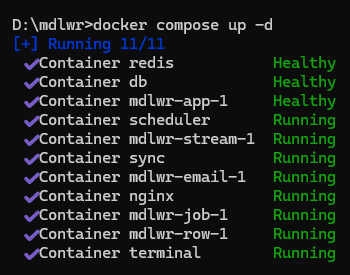
Expected Running Services:
- Infrastructure:
redis,db(PostgreSQL),nginx - Core Application:
mdlwr-app-1,terminal - Asynchronous Workers:
scheduler,sync,mdlwr-job-1,mdlwr-row-1,mdlwr-email-1,mdlwr-stream-1
Verifying the Deployment
To ensure all containers are running smoothly without errors, check the logs or container status using:
7. Operational Management Scripts (mdlwr.sh / mdlwr.bat)
To simplify daily application management and container orchestration, you can use management helper scripts. Place these scripts in the root deployment directory alongside your docker-compose.yml file.
Linux / Unix Environments (mdlwr.sh)
Create mdlwr.sh in /opt/mdlwr/mdlwr.sh to easily control container lifecycles and monitor deployment durations:
#!/usr/bin/env bash

# Default action to 'restart' if no argument is provided
ACTION="${1:-restart}"

echo "===================================="
echo "  MDLWR CLI: docker compose $ACTION"
echo "===================================="

if [ "$ACTION" = "start" ]; then
    shift 1
    time docker compose up -d "$@"
elif [ "$ACTION" = "stop" ]; then
    shift 1
    time docker compose down "$@"
elif [ "$ACTION" = "restart" ]; then
    time (docker compose down && docker compose up -d)
else
    time docker compose "$@"
fi

echo "===================================="
Make the script executable:
Usage Examples:
./mdlwr.sh          # Restarts the entire stack (default)
./mdlwr.sh start    # Starts containers in detached mode
./mdlwr.sh stop     # Stops and removes containers
./mdlwr.sh ps       # Passes custom commands directly to docker compose
Windows Environments (mdlwr.bat)
For Windows-based host environments, create mdlwr.bat inside your deployment root directory (e.g., D:\mdlwr\mdlwr.bat):
@echo off
setlocal enabledelayedexpansion

set "COMMAND=%~1"
if "%COMMAND%"=="" set "COMMAND=restart"

:: Command Aliases
if /i "%COMMAND%"=="start" set "COMMAND=up -d"
if /i "%COMMAND%"=="stop" set "COMMAND=down"

echo ====================================
echo    MDLWR CLI: docker compose %COMMAND%
echo ====================================

:: Capture Start Time
set "T_START=%time%"
call :GetSeconds "%T_START%" SEC_START

if /i "%COMMAND%"=="restart" (
    cmd /v:on /c "docker compose down"
    echo ------------------------------------
    cmd /v:on /c "docker compose up -d"
) else (
    cmd /v:on /c "docker compose %*"
)

:: Capture End Time
set "T_END=%time%"
call :GetSeconds "%T_END%" SEC_END

:: Calculate Execution Duration
set /a DURATION=%SEC_END% - %SEC_START%

:: Handle Midnight Crossover
if %DURATION% LSS 0 set /a DURATION+=86400

echo ------------------------------------
echo  Start           : %T_START%
echo  Finish          : %T_END%
echo  TOTAL Duration  : %DURATION% second(s)
echo ====================================
goto :eof

:: Helper Function: Convert %time% to Total Seconds
:GetSeconds
for /f "tokens=1-4 delims=:. " %%a in ("%~1") do (
    set /a "h=100%%a %% 100", "m=100%%b %% 100", "s=100%%c %% 100"
    set /a "%2=(h*3600) + (m*60) + s"
)
goto :eof
Usage Examples: