Manual Guide: Users Management
The Users Management module is an administrator-restricted security dashboard designed to oversee application accounts, system privileges, authentication states, and programmatic access tokens.
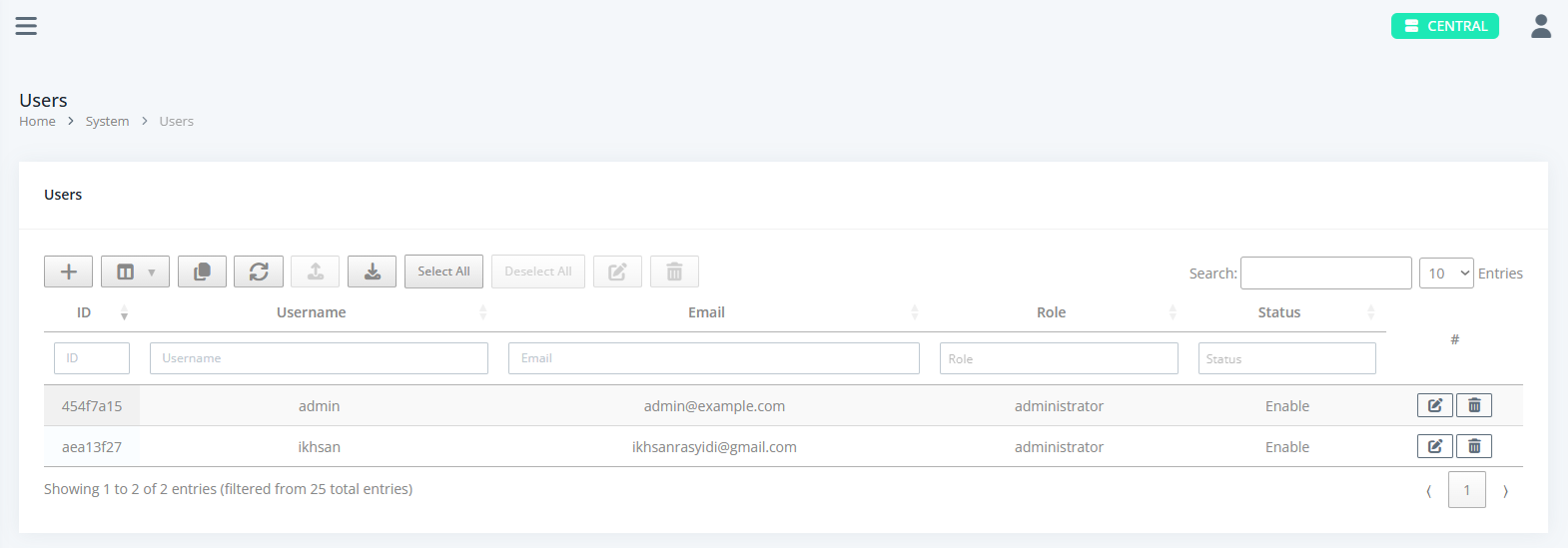
1. Interface & Architecture Overview
The Users page features a secure, enterprise-grade management layout:
- Users Data Grid (Main): A DataTables table listing system profiles with advanced column filters, search inputs, status indicators (Enabled / Offline), and role assignments (Administrator / Operator).
- User Data Editor (Slide-over Panel): A dual-tab management interface (
DetailsandAPI Keys) used for inspecting or updating account privileges, credentials, and associated API clients. - API Key Modal: A high-security one-time display prompt that exposes newly generated raw API keys for secure system-to-system integrations.
2. Core Features & Components
User Account Administration
- Role-Based Restrictions: Restricted exclusively to users assigned administrator privileges.
- Status Tracking: Visual color-coding highlights user connection states (e.g., active vs. suspended/offline).
- Bulk Data Operations: Select multiple user records to execute batch modifications or download packaged ZIP backups.
Integrated API Key Management (API Keys Tab)
- Dedicated Client Tokens: Generate, monitor usage, toggle status, or revoke API access keys associated with specific user accounts.
- Secure Display: Newly created API keys are displayed exactly once via a modal alert to guarantee credential safety.
3. Standard Table Operations
For complete guidelines on how to use standard table utility features (such as ColVis, copying data, Export/Import, Refresh, Bulk Delete, etc.), please refer to the Standard Tables Guide.