Manual Guide: Custom Tables Data
Overview
The Custom Tables Data module is a dynamic interface designed for database table inspection, record creation, editing, deletion, CSV exporting, and table-level maintenance (such as truncating and archiving restoration). Any custom table created within the system is automatically detected and populated into the table selector dropdown categorized by groups.
Key Features & UI Layout
1. Table Selector
-
Automatically fetches all system and custom tables from the backend endpoint.
-
Automatically manages truncation permissions and remote site submit controls on selection change.
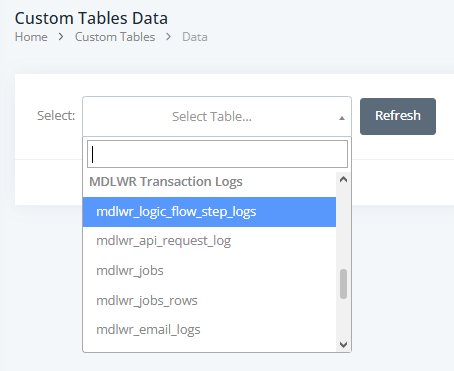
2. Server-Side Tables Grid
-
Server-Side Processing: Integrates with backend pagination, searching, and sorting.
-
Column Checkbox Controls: Header checkboxes allow granular field selection for exports and visibility configuration.
-
Inline Column Searching: Dedicated search inputs per column with a clear filter option (x).
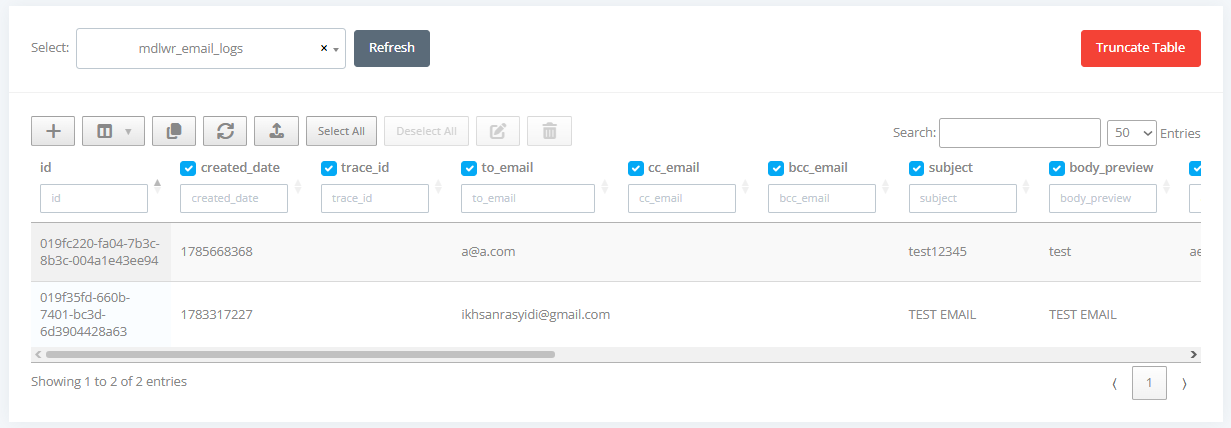
3. Data Editor Panel
-
Supports two distinct states: Create and Update.
-
Dynamically generates form inputs based on the target table's underlying schema columns and types (handling
JSON,TEXT, system timestamps, andIDfields). -
Automatically locks down system-managed fields (e.g.,
created_date,last_modify_date) to prevent manual modification errors. -
Supports multi-row batch modification when multiple table rows are selected.

4. Standard Table Operations
For complete guidelines on how to use standard table utility features (such as ColVis, copying data, Export/Import, Refresh, Bulk Delete, etc.), please refer to the Standard Tables Guide.